Monday, 1 April 2013

How to Create an ASMX Web Service on SharePoint 2010, Using Visual Studio 2010


How to Create an ASMX Web Service on SharePoint 2010, Using Visual Studio 2010
Back in SharePoint 2007, asmx web services were quite prevalent, thanks to the WSPBuilder tool, and it’s templates.   They are useful for executing actions between multiple web applications and can be used by client applications, as well.  Furthermore, InfoPath forms, deployed to SharePoint, could also use these asmx web services.
Unfortunately, Visual Studio 2010 did not come with a template for SharePoint web services.  So, today I will be writing about how we can create asmx web services for SharePoint 2010.  All you will need is SharePoint 2010.
First, start a new Empty SharePoint 2010 project.  I will call this SPASMXService.
Make sure to deploy it as a farm solution.
 First, you need to close this project by right clicking on the project and then selecting ‘unload project’.
Then, right click on the project again, and select, ‘Edit SPASMXService’.
Under <SandboxedSolution>False</SandboxedSolution> type in:
<TokenReplacementFileExtensions>asmx</TokenReplacementFileExtensions>
This will be the result:
 Then, save and close out of this xml file.  This will allow Visual Studio to insert the solution information where necessary.  Therefore, this is a crucial step!  Finally, reload the project file.
Next, we will be creating the web service.  Right click on the project, and select “Add” and then select “New Class…”  This will be the code behind.  Let’s just call this SPASMXService.cs.
Now, open SPASMXService.cs, and make the following changes:

 namespace Test
{
    [System.ComponentModel.ToolboxItem(false)]
    [WebServiceBinding(ConformsTo = WsiProfiles.BasicProfile1_1), WebService(Namespace = "http://www.tempuri.org/")]
    [System.Web.Script.Services.ScriptService]
    public class PatientDoc_webservice : System.Web.Services.WebService
    {
        [WebMethod(EnableSession = true, Description = "Typical Web Method")]
        public List<string> Helloworld(string prefixText, string contextKey)
        {
          
            List<string> ss = new List<string>();
            SPSite spSite; SPWeb spWeb; SPList spList;
            DataTable dtCareGiverFile = new DataTable();
            DataSet dtcare = new DataSet();
            dtCareGiverFile.TableName = "testname";
            spSite = SPContext.Current.Site;
            if (contextKey != null)
            {
                SPSecurity.RunWithElevatedPrivileges(delegate()
                {
                    spSite.AllowUnsafeUpdates = true;
                    using (spWeb = spSite.OpenWeb())
                    {
                        spWeb.AllowUnsafeUpdates = true;

                        spList = spWeb.Lists["PatientDocuments"];


                        var query = from SPListItem item in spList.Items
                                    where Convert.ToString(item["PatientID"]).Equals(contextKey)
                                    select item;

                        dtCareGiverFile.Columns.Add("FileName");
                        dtCareGiverFile.Columns.Add("Length");
                        dtCareGiverFile.Columns.Add("FileData");
                        dtCareGiverFile.Columns.Add("ID");
                        dtCareGiverFile.Columns.Add("CreatedBy");
                        dtCareGiverFile.Columns.Add("CreatedDate");


                        if (query != null)
                        {

                            foreach (var item in query)
                            {
                                SPAttachmentCollection attachments = item.Attachments;
                                foreach (var itemA in attachments)
                                {

                                    var t = attachments[0].ToLower().StartsWith(prefixText.ToLower());
                                    if (t == true)
                                    {
                                        DataRow dr = dtCareGiverFile.NewRow();
                                        String attachmentAbsoluteURL = attachments.UrlPrefix + itemA;
                                        SPFile attachmentFile = spWeb.GetFile(attachmentAbsoluteURL);
                                        int filelength = Convert.ToInt32(attachmentFile.Length / 1024);

                                        dr["ID"] = item.ID;
                                        dr["Length"] = filelength;
                                        dr["FileName"] = itemA;
                                        ss.Add(Convert.ToString(itemA));
                                        dr["FileData"] = attachmentAbsoluteURL.ToString();
                                        dr["CreatedBy"] = Convert.ToString(item["UploadedBy"]);
                                        dr["CreatedDate"] = item["Created"];
                                       
                                        dtCareGiverFile.Rows.Add(dr);
                                    }
                                }
                            }

                        }
                        spWeb.AllowUnsafeUpdates = false;

                    }
                    spSite.AllowUnsafeUpdates = false;

                });
            }

            return ss;

        }


        public DataTable GetDocuments(string prefixText,string contextKey,string Discipline)
        {

          
            SPSite spSite; SPWeb spWeb; SPList spList;
            SPList spList1; SPList spList2;
           
            DataTable dtCareGiverFile = new DataTable();
           
            SPSecurity.RunWithElevatedPrivileges(delegate()
            {
                using (spSite = new SPSite(SPContext.Current.Site.Url))
                {
                    spSite.AllowUnsafeUpdates = true;
                    using (spWeb = spSite.OpenWeb())
                    {
                        spWeb.AllowUnsafeUpdates = true;

                        spList = spWeb.Lists["PatientDocuments"];
                        spList1 = spWeb.Lists["ActiveDirectoryUserList"];
                        spList2 = spWeb.Lists["CareGiverProfile"];

                        dtCareGiverFile.Columns.Add("FileName");
                        dtCareGiverFile.Columns.Add("Length");
                        dtCareGiverFile.Columns.Add("FileData");
                        dtCareGiverFile.Columns.Add("ID");
                        dtCareGiverFile.Columns.Add("CreatedBy");
                        dtCareGiverFile.Columns.Add("CreatedDate");
                        dtCareGiverFile.Columns.Add("Discipline");


                        var query = from SPListItem item in spList.Items
                                    where Convert.ToString(item["PatientID"]).Equals(contextKey)
                                    select item;
                             
                       
                        if (query != null)
                        {
                            foreach (var item in query)
                            {
                                SPAttachmentCollection attachments = item.Attachments;
                                foreach (var itemA in attachments)
                                {
                                    string attname = attachments[0].ToLower();

                                     var t = attachments[0].ToLower().StartsWith(prefixText.ToLower());
                                     if (t == true)
                                     {
                                        
                                                DataRow dr = dtCareGiverFile.NewRow();
                                                String attachmentAbsoluteURL = attachments.UrlPrefix + itemA;
                                                SPFile attachmentFile = spWeb.GetFile(attachmentAbsoluteURL);
                                                int filelength = Convert.ToInt32(attachmentFile.Length / 1024);
                                                dr["ID"] = item.ID;
                                                dr["Length"] = filelength;
                                                dr["FileName"] =Convert.ToString(itemA);
                                                dr["FileData"] = attachmentAbsoluteURL.ToString();
                                                dr["CreatedBy"] = Convert.ToString(item["UploadedBy"]);                                            
                                               // dr["Discipline"] = Discipline;                                      
                                                string hdndis = Convert.ToString(item["UploadedBy"]);

                                         if(Convert.ToString(item["UploadedBy"])=="system")
                                         {
                                             dr["Discipline"] = "Admin Group";
                                         }
                                                var query1 = from SPListItem item1 in spList1.Items
                                                             where Convert.ToString(item1["UserLogonName"]).Equals(hdndis)
                                                            select item1;


                                                if (query1 != null)
                                                {
                                                    foreach (var item1 in query1)
                                                    {
                                                        string s = Convert.ToString(item1["UserType"]);
                                                        if (Convert.ToInt32(s) == 1)
                                                        {
                                                            dr["Discipline"] = "Admin Group";
                                                        }
                                                        if (Convert.ToInt32(s) == 2)
                                                        {
                                                            dr["Discipline"] = "Agency Group";
                                                        }

                                                        if (Convert.ToInt32(s) == 3 || Convert.ToInt32(s) == 4)
                                                        {

                                                            var query2 = from SPListItem item2 in spList2.Items
                                                                         where Convert.ToString(item2["UserName"].ToString().Split('\\').GetValue(1).ToString()).Equals(hdndis)
                                                                         select item2;

                                                            if (query2 != null)
                                                            {
                                                                foreach (var item2 in query2)
                                                                {
                                                                    string hdndisid = Convert.ToString(item2["Discipline"]);
                                                                    if (Convert.ToInt32(hdndisid) == 1 || Convert.ToInt32(hdndisid) == 2)
                                                                    {
                                                                        dr["Discipline"] = "OT";
                                                                    }
                                                                    if (Convert.ToInt32(hdndisid) == 3 || Convert.ToInt32(hdndisid) == 4)
                                                                    {
                                                                        dr["Discipline"] = "PT";
                                                                    }
                                                                    if (Convert.ToInt32(hdndisid) == 5 || Convert.ToInt32(hdndisid) == 6)
                                                                    {
                                                                        dr["Discipline"] = "SP";
                                                                    }

                                                                }
                                                            }

                                                        }
                                                    }
                                                }
                                               

                                         dr["CreatedDate"] = item["Created"];
                                         dtCareGiverFile.Rows.Add(dr);
                                              
                                             }
                                         }


                                     }
                                }
                            }
                        }
                   
               
            });
            return dtCareGiverFile;
        }


        public bool DeleteFileByID(string TicketID, bool IsDel)
        {
            SPSite spSite; SPWeb spWeb; SPList spList;
            SPSecurity.RunWithElevatedPrivileges(delegate()
            {
                using (spSite = new SPSite(SPContext.Current.Site.Url))
                {
                    spSite.AllowUnsafeUpdates = true;
                    using (spWeb = spSite.OpenWeb())
                    {
                        spWeb.AllowUnsafeUpdates = true;
                        spList = spWeb.Lists["PatientDocuments"];
                        SPListItem myItem = spList.GetItemById(Convert.ToInt32(TicketID));
                        if (myItem != null)
                        {
                            myItem.Delete();
                            IsDel = true;
                        }

                        spWeb.AllowUnsafeUpdates = false;
                    }
                    spSite.AllowUnsafeUpdates = false;
                }
            }
           ); return IsDel;
        }


This is a good start for a web service with a web method.  Now, of course we have a few errors because we still have not brought in the necessary libraries.  Right click on ‘references’ in the Solution Explorer, and select, ‘Add Reference’.  Select System.Web.Services from the .NET tab.  Then, in SPASMXService.cs, add, ‘using System.Web.Services’.  This should look like this:
Finally, we have to create the service page.  I like to keep it in the _layouts folder, but you can keep it elsewhere using similar steps.  Right click on the project item in the solution explorer, and select add -> SharePoint “Layouts” Mapped Folder.
You can also select SharePoint Mapped Folder, and then select ISAPI.  This would cause the page to go into _vti_bin instead.
For now, I’m going to stick to _layouts:
The SPASMXService folder was automatically made.  Nice.
Inside the SPASMXService, under Layouts, we will add a new file of type xml.  We Shall call it SPASMXService.asmx.
The contents of SPASMXService.asmx will be a single line:

 <%@ WebService Language=”C#” Debug=”true” Class=”[Class path], $SharePoint.Project.AssemblyFullName$”  %>
 Where [class path] is the full namespace name of the SPASMXService class in SPASMXService.cs.  In my case, the line will be:
namespace Test
{
    [System.ComponentModel.ToolboxItem(false)]
    [WebServiceBinding(ConformsTo = WsiProfiles.BasicProfile1_1), WebService(Namespace = "http://www.tempuri.org/")]
    [System.Web.Script.Services.ScriptService]
    public class PatientDoc_webservice : System.Web.Services.WebService
    {
        [WebMethod(EnableSession = true, Description = "Typical Web Method")]
        public List<string> Helloworld(string prefixText, string contextKey)
        {
          
            List<string> ss = new List<string>();
            SPSite spSite; SPWeb spWeb; SPList spList;
            DataTable dtCareGiverFile = new DataTable();
            DataSet dtcare = new DataSet();
            dtCareGiverFile.TableName = "testname";
            spSite = SPContext.Current.Site;
            if (contextKey != null)
            {
                SPSecurity.RunWithElevatedPrivileges(delegate()
                {
                    spSite.AllowUnsafeUpdates = true;
                    using (spWeb = spSite.OpenWeb())
                    {
                        spWeb.AllowUnsafeUpdates = true;

                        spList = spWeb.Lists["PatientDocuments"];


                        var query = from SPListItem item in spList.Items
                                    where Convert.ToString(item["PatientID"]).Equals(contextKey)
                                    select item;

                        dtCareGiverFile.Columns.Add("FileName");
                        dtCareGiverFile.Columns.Add("Length");
                        dtCareGiverFile.Columns.Add("FileData");
                        dtCareGiverFile.Columns.Add("ID");
                        dtCareGiverFile.Columns.Add("CreatedBy");
                        dtCareGiverFile.Columns.Add("CreatedDate");


                        if (query != null)
                        {

                            foreach (var item in query)
                            {
                                SPAttachmentCollection attachments = item.Attachments;
                                foreach (var itemA in attachments)
                                {

                                    var t = attachments[0].ToLower().StartsWith(prefixText.ToLower());
                                    if (t == true)
                                    {
                                        DataRow dr = dtCareGiverFile.NewRow();
                                        String attachmentAbsoluteURL = attachments.UrlPrefix + itemA;
                                        SPFile attachmentFile = spWeb.GetFile(attachmentAbsoluteURL);
                                        int filelength = Convert.ToInt32(attachmentFile.Length / 1024);

                                        dr["ID"] = item.ID;
                                        dr["Length"] = filelength;
                                        dr["FileName"] = itemA;
                                        ss.Add(Convert.ToString(itemA));
                                        dr["FileData"] = attachmentAbsoluteURL.ToString();
                                        dr["CreatedBy"] = Convert.ToString(item["UploadedBy"]);
                                        dr["CreatedDate"] = item["Created"];
                                       
                                        dtCareGiverFile.Rows.Add(dr);
                                    }
                                }
                            }

                        }
                        spWeb.AllowUnsafeUpdates = false;

                    }
                    spSite.AllowUnsafeUpdates = false;

                });
            }

            return ss;
}
         Finally, save everything, and then deploy the solution.
If everything went right, you should see this using Internet Explorer:
If you used ISAPI instead of Layouts, _layouts in that screenshot should be _vti_bin, instead.  If you opened this from a front end server with web service, then you can further test this web service by clicking on that link.

Lastly, a bit of trouble shooting; you can check on the web service page by going to:

C:\Program Files\Common Files\Microsoft Shared\Web Server Extensions\14\TEMPLATE\LAYOUTS

If you used ISAPI instead of LAYOUTS, then instead go to:

C:\Program Files\Common Files\Microsoft Shared\Web Server Extensions\14\ISAPI

If the web service does not load on Internet explorer, then you should open the asmx page from one of these two locations.  If you open the asmx page from one of these two locations, and you still find “$SharePoint.Project.AssemblyFullName$”, then you need to go back to the top of this article and follow the steps regarding unloading and reloading the project.

Wednesday, 6 March 2013

Sample WorkFlow


Sample WorkFlow

Intro:

This is a sample workflow , it ll send mail to a depends on a status,that status is matained by a field of a list

Step1: Create a empty sharepoint project


Create a list in your sit with the following columns:

1. EmployeeName

2. StartDate

3. EndDate

4. PMStatus

5. MailPM

6. MailAdmin

7. AdminStatus

8. ReasonforLeave


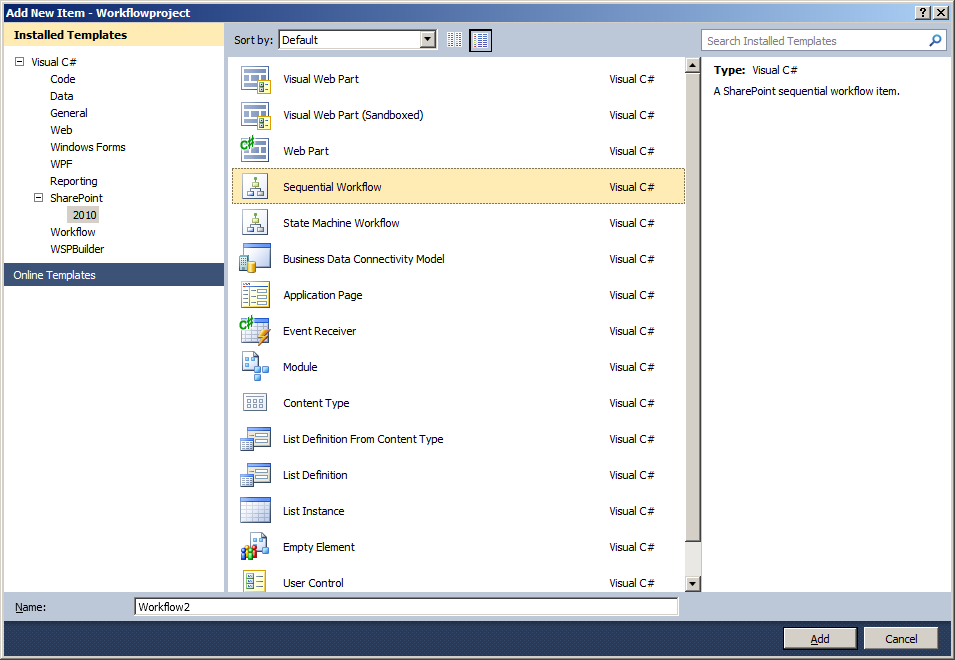
Step2: Create a new Sequential workflow(by add new item in that project)


You can find this workflow in soln explorer


And also you can find this in thatWorkflow1[Design]


Step3: By double click on that event(onWorkflowActivated1)you ll get invoked method for that you can write some codings which are need to be done.at the time of workflow activated.

Step4:we can insert a condition (If-else)that’s placed at toolbox


Step5: you can write conditions with the property of ifElseActivity1&2

Properties-condition-codecondition-contion-“name of that function”(ismailsenttoPM) it ll create a function in cs page,

Paste this coding in that function

private void ismailsenttoPM(objectsender, ConditionalEventArgs e)

{

getdata();

if(mailStatis == "Yes")

{

e.Result = true;

}

else

{

e.Result = false;

}

}

private void getdata()

{

//GetUsername();

intid1 = Convert.ToInt16(workflowProperties.Item["ID"].ToString());


SPListobjList = workflowProperties.Web.Lists["Leave"];


SPListItemmyItem = workflowProperties.Web.Lists["Leave"].GetItemById(Convert.ToInt16(id1));

if((int)myItem["ID"] == id1)

{

id = Convert.ToInt16(myItem.ID);

Name = Convert.ToString(myItem["EmployeeName"]);

StartDate = Convert.ToString(myItem["StartDate"]);

EndDate = Convert.ToString(myItem["EndDate"]);

Status = Convert.ToString(myItem["PMStatus"]);

mailStatis = Convert.ToString(myItem["MailPM"]);

mailstatusadmin = Convert.ToString(myItem["MailAdmin"]);

adminappstatus = Convert.ToString(myItem["AdminStatus"]);

Reason = Convert.ToString(myItem["ReasonforLeave"]);

}

}


Step6: we can put a code activity in that ifElseActivity1 and write the code condition for that activity


code condition Name(sendmailtouser)

private void sendmailtouser(objectsender, EventArgs e)

{


SPSitespSite; SPWeb spWeb; SPList spList;

SPSecurity.RunWithElevatedPrivileges(delegate()

{

using(spSite = new SPSite("http://sp4:1"))

{

spSite.AllowUnsafeUpdates =true;

using(spWeb = spSite.OpenWeb())

{

spWeb.AllowUnsafeUpdates = true;


StringBuilder Body = new StringBuilder("<table cellpadding='3' cellspacing='0' width='70%'>");


Body.Append("<tr><td><font face='verdana' size='2'>Dear PM, </font></td></tr>");

Body.Append("<tr><td nowrap><font face='verdana' size='2'>I need Leave from " + StartDate + " To " + EndDate + " </font></td></tr>");

Body.Append("<tr><td nowrap><font face='verdana' size='2'>for the Reason of " + Reason + "< /font></td></tr>");

Body.Append("<tr><td>URL:<a href='http://fpf:3344/Pages/NewPMStatus.aspx?ID=" + id + "'>Click Here</a> to see Approve or Reject</td></tr>");


Body.Append("<tr><td>&nbsp;</td></tr>");

Body.Append("<tr><td><font face='verdana' size='2'><b>Sincerely,</font></td></tr>");

//Body.Append("<tr><td><font face='verdana' size='2'><b>Administrator,</font></td></tr>");

Body.Append("<tr><td><font face='verdana' size='2'><b>"+ Name + "</font></td></tr>");


SPUtility.SendEmail(spWeb, false,false, "ranjith@themajesticpeople.com","Hi", Body.ToString(), false);

}

}

});


}


Step7: create code conditions and code activity for the other branch.

Finally it shows like below image


Step8: deploy this for the desired list (it would have option for initiate at the time of item created and updated)

Step9: In your site you can find that workflow (in workflow settings of that list)

Step10:add an item to that list (you ll be receiving mail depends on status of that item)

Wednesday, 6 February 2013

Difference Between Event Receivers and Workflows in SharePoint

As SharePoint Event Receivers & SharePoint workflows has lot of similarities, Many people stuck on deciding which one to go with: Event Receiver or Workflow?

Main Differences Between SharePoint Event Receivers and SharePoint Workflows are:

1. Event handlers Can't be manually initiated - workflows can be initiated either automatically or manually.

2. Event Handlers can be Synchronous or Asynchronous - Workflows are always async (They executes after the operation)

3. In Event Receivers we can cancel the operation (such as add/update/delete) - But in Workflows its not possible.

4. Event handlers execute from a Particular WFE, So when something goes wrong in that WFE, It may end-up. But Workflow Jobs are robust and can resume even after Reboots.

5. Usually Event handlers runs for short period - Workflows can be longer even for years!

6. There is no User Interface/user Interaction in Event Receivers - Workflows can have user interactions such as getting user input in Initiation forms.

7. As the Name indicates, SharePoint Event receivers are triggered by events like New Item Adding-Added, Updating-Updated, Deleting-Deleted, etc. - But Workflows triggered only on Creation/Change/deletion.

8. Event Receivers are created using Visual studio - Workflows can be via SharePoint user interface, SharePoint Designer, Visio or Visual studio.

9. Workflows leave "Workflow History" logs which we can refer for debugging - Event handler doesn't do such.

10. Event receivers are better for large volume - Workflows are better for small amount of data.

Wednesday, 7 November 2012

Disable right click using javascript

<script type="text/javascript">

    var message = "";

    function clickIE() {
        if (document.all)
        { (message); return false; }
    }

    function clickNS(e) {
        if
(document.layers || (document.getElementById && !document.all)) {
            if (e.which == 2 || e.which == 3) { (message); return false; }
        }
    }

    if (document.layers)
    { document.captureEvents(Event.MOUSEDOWN); document.onmousedown = clickNS; }
    else
    { document.onmouseup = clickNS; document.oncontextmenu = clickIE; }
    document.oncontextmenu = new Function("return false")

</script>

Yahoo feed using to show the weather


1.Yahoo feed using to show the weather details
2.store the city in cookie
3.zipcode using to get the cityname

 Script
---------

<script type="text/javascript" src="/_layouts/Styles/VCSB/Js/jquery-1.3.2.min.js"></script>
<script type="text/javascript" language="javascript">
function weather() {
        var t;
        var city = document.getElementById("<%= TxtCity.ClientID %>").value;
        if (city != null && city != "") {           
            var locationQuery = 'SELECT id FROM xml WHERE url="http://xoap.weather.com/search/search?where=' + city + ' " AND itemPath="search.loc"'
            var locationUrl = 'http://query.yahooapis.com/v1/public/yql?q=' + encodeURIComponent(locationQuery) + '&format=json';
            $.getJSON(locationUrl + '&callback=?', function (data) {              
                if (data.query != null && data.query != "" && data.query.results != null && data.query.results != "") {                
                    var locationId = data.query.results.loc.id;                  
                    $('#weatherData .weather-location').append('Weather for ' + city + ' (' + locationId + ')');
                    var weatherUnit = 'f'; //c for Celcius, f for Fahrenheit     
                    var weatherQuery = 'SELECT * FROM rss WHERE url="http://xml.weather.yahoo.com/forecastrss/' + locationId + '_' + weatherUnit + '.xml"';
                    var weatherUrl = 'http://query.yahooapis.com/v1/public/yql?q=' + encodeURIComponent(weatherQuery) + '&format=json';
                    $.getJSON(weatherUrl + '&callback=?', function (data) {
                      
                        var weatherForecasts = data.query.results.item.forecast;
                        if (weatherForecasts != null) {
                            var code = weatherForecasts[0].code;
                            $('input:textbox[id$=txtlocation]').val(city);
                            $('input:textbox[id$=txthigh]').val(weatherForecasts[0].high + '°F');
                            $('input:textbox[id$=txtlow]').val(weatherForecasts[0].low + '°F');
                            $('input:textbox[id$=txtfeelslike]').val(weatherForecasts[0].text);
                            //$('input:image[id$=imgicon]').attr('src','<TD><DIV title="' + weatherForecasts[0].text + '" /></TD>').find('DIV:last').css('background-position', '-' + (61 * code) + 'px 0px');
                            //                           $('divIcon').css({backgroundImage:'url(http://l.yimg.com/a/lib/ywc/img/wicons.png)',backgroundRepeat:'no-repeat',backgroundPosition:'+(61 * code)+'px 0px'});;
                            $('#divIcon').css({ backgroundImage: 'url(http://l.yimg.com/a/lib/ywc/img/wicons.png)', backgroundRepeat: 'no-repeat', backgroundPosition: '-1830px 0px', width: '61px', height: '45px' }); ;
                            var testloc = $('input:hiddenfield[id$=htnlocation]').val();
                            $('input:textbox[id$=txtlocation]').val(testloc);
                            document.cookie = "";
                            var name = "test";
                            var date = new Date();
                            date.setTime(date.getTime() + (365 * 24 * 60 * 60 * 1000));
                            var expires = "; expires=" + date.toGMTString();
                            document.cookie = name + "=" + $('input:textbox[id$=txtlocation]').val() + expires + "; path=/";
                            //document.cookie = $('input:textbox[id$=txtlocation]').val();
                        }
                        else {
                            $('input:textbox[id$=txtlocation]').val('City not available');
                            $('input:textbox[id$=txthigh]').val('N/A');
                            $('input:textbox[id$=txtlow]').val('N/A');
                            $('input:textbox[id$=txtfeelslike]').val('N/A');
                        }
                    });
                }
                else {
                    $('input:textbox[id$=txtlocation]').val('City not available');
                    $('input:textbox[id$=txthigh]').val('N/A');
                    $('input:textbox[id$=txtlow]').val('N/A');
                    $('input:textbox[id$=txtfeelslike]').val('N/A');
                }
            });
        }
        else {
            var tt,city1,city3 = "";
            if (document.cookie.length != 104 && document.cookie.length != 67 && document.cookie.length != 111) {
                var nameEQ = "test" + "=";
                var ca = document.cookie.split(';');
                for (var i = 0; i < ca.length; i++) {
                    var c = ca[i];
                    while (c.charAt(0) == ' ')
                        c = c.substring(1, c.length);
                    if (c.indexOf(nameEQ) == 0)
                        tt = c.substring(nameEQ.length, c.length);
                }
                var city2 = tt.split(' ');
               
                if (city2.length > 1) {
                    for (var i = 1; i < city2.length; i++) {
                        city3 += city2[0] + city2[i];
                    }
                    city1 = city3;
                }
                else {
                    city1 = tt;
                }
            }
            else {
                city1 = "Deland,FL";
            }
          
            var locationQuery = 'SELECT id FROM xml WHERE url="http://xoap.weather.com/search/search?where=' + city1 + ' " AND itemPath="search.loc"'
            var locationUrl = 'http://query.yahooapis.com/v1/public/yql?q=' + encodeURIComponent(locationQuery) + '&format=json';
           
            $.getJSON(locationUrl + '&callback=?', function (data) {
               
                if (data.query != null && data.query != "" && data.query.results != null && data.query.results != "") {
                 
                    var locationId = data.query.results.loc.id;
                    $('#weatherData .weather-location').append('Weather for ' + city1 + ' (' + locationId + ')');
                    var weatherUnit = 'f'; //c for Celcius, f for Fahrenheit     
                    var weatherQuery = 'SELECT * FROM rss WHERE url="http://xml.weather.yahoo.com/forecastrss/' + locationId + '_' + weatherUnit + '.xml"';
                    var weatherUrl = 'http://query.yahooapis.com/v1/public/yql?q=' + encodeURIComponent(weatherQuery) + '&format=json';
                    $.getJSON(weatherUrl + '&callback=?', function (data) {
                        var weatherForecasts = data.query.results.item.forecast;
                        if (weatherForecasts != null) {
                            var code = weatherForecasts[0].code;
                            $('input:textbox[id$=txtlocation]').val(tt);
                            $('input:textbox[id$=txthigh]').val(weatherForecasts[0].high + '°F');
                            $('input:textbox[id$=txtlow]').val(weatherForecasts[0].low + '°F');
                            $('input:textbox[id$=txtfeelslike]').val(weatherForecasts[0].text);
                            //$('input:image[id$=imgicon]').attr('src','<TD><DIV title="' + weatherForecasts[0].text + '" /></TD>').find('DIV:last').css('background-position', '-' + (61 * code) + 'px 0px');
                            //                           $('divIcon').css({backgroundImage:'url(http://l.yimg.com/a/lib/ywc/img/wicons.png)',backgroundRepeat:'no-repeat',backgroundPosition:'+(61 * code)+'px 0px'});;
                            $('#divIcon').css({ backgroundImage: 'url(http://l.yimg.com/a/lib/ywc/img/wicons.png)', backgroundRepeat: 'no-repeat', backgroundPosition: '-1830px 0px', width: '61px', height: '45px' }); ;
                        }
                        else {
                          
                            $('input:textbox[id$=txtlocation]').val('City not available');
                            $('input:textbox[id$=txthigh]').val('N/A');
                            $('input:textbox[id$=txtlow]').val('N/A');
                            $('input:textbox[id$=txtfeelslike]').val('N/A');
                        }
                    });
                }
                else {
                  
                    $('input:textbox[id$=txtlocation]').val('City not available');
                    $('input:textbox[id$=txthigh]').val('N/A');
                    $('input:textbox[id$=txtlow]').val('N/A');
                    $('input:textbox[id$=txtfeelslike]').val('N/A');
                }
            });
        }
    }
    window.onload = weather;
</script>

  ascx
------------
<style type="text/css">
    #weatherData TD
    {
        text-align: center;
        padding-left: 15px;
        padding-right: 15px;
    }
    #weatherData CAPTION
    {
        font-style: italic;
        font-weight: bold;
    }
    .weather-icon DIV
    {
        background-image: url(http://l.yimg.com/a/lib/ywc/img/wicons.png);
      
        width: 61px;
        height: 34px;
    }  
    .td1
{
font-size:9px;
font-family:verdana,arial,helvetica,sans-serif;
}
</style>
<div id="weatherData">
    <asp:Panel ID="pnlWeather1" DefaultButton="ImgBtnGo" runat="server">
        <div class="menu_bg_sd">
            <div class="menu_left_sd">
            </div>
            <div class="menu_right_sd">
            </div>
            <h4>
                Weather & Local Info</h4>
        </div>
        <div class="menu_bg_sd_ind">
            <div class="menu_left_sd_ind">
            </div>
            <div class="menu_right_sd_ind">
            </div>
            <div class="box_inner_m2">
                <table width="100%" border="0" cellspacing="2" cellpadding="1" >
                    <tr>
                        <td align="left" valign="middle" style="color: Red; font-size: 14px; height: 25px;
                            font-weight: bold;" colspan="2">
                            <asp:TextBox ID="txtlocation" BackColor="#EEEEEE" Font-Bold="true" Height="25px" Font-Size="14px" ForeColor="#FF6600" BorderStyle="None" ReadOnly="true" runat="server"></asp:TextBox><br />
                        </td>
                    </tr>
                    <tr>
                        <td colspan="2" style="height:50px;">
                            <div id="divIcon" >
                            </div>
                        </td>
                       
                    </tr>
                    <tr>        
                         
                    <td align="right" valign="middle" style="font-size:9px;font-family:verdana,arial,helvetica,sans-serif;">Maximum:
                        </td>
                   <td  align="left" valign="middle">
                                <asp:TextBox ID="txthigh" BackColor="#EEEEEE" BorderStyle="None" Font-Size="9px" ReadOnly="true" Width="50px" runat="server"></asp:TextBox>
                        </td>
                    </tr>
                     <tr>
                     <td align="right" valign="middle" style="font-size:9px;font-family:verdana,arial,helvetica,sans-serif;">Minimum:
                        </td>
                   <td  align="left" valign="middle">
                            <asp:TextBox ID="txtlow"  BackColor="#EEEEEE" BorderStyle="None" Font-Size="9px" ReadOnly="true" Width="50px"  runat="server"></asp:TextBox>
                        </td>
                    </tr>
                    <tr>
                        <td valign="middle" style="font-size:9px;font-family:verdana,arial,helvetica,sans-serif;" >
                            Feels Like:
                        </td>
                        <td align="left">
                            <asp:TextBox ID="txtfeelslike" Width="112px" Font-Size="9px" BorderStyle="None" BackColor="#EEEEEE"  ReadOnly="true"  runat="server"></asp:TextBox>
                        </td>
                    </tr>
                    <tr>
                   
                    </tr>
                    <tr>
                        <td colspan="2" align="center" valign="middle" style="padding-top:10px;">
                            <asp:TextBox ID="TxtCity" ValidationGroup="weather1" MaxLength="50" Width="110px"
                                Height="15px" runat="server"></asp:TextBox>
                            <cc1:TextBoxWatermarkExtender ID="TextBoxWatermarkExtender1" TargetControlID="TxtCity"
                                WatermarkText="City or Zipcode" WatermarkCssClass="watercolor" runat="server">
                            </cc1:TextBoxWatermarkExtender>
                            <asp:ImageButton ID="ImgBtnGo" ToolTip="Go" runat="server" CausesValidation="false"
                                ValidationGroup="weather1" OnClientClick="weather();" ImageAlign="Top"
                                ImageUrl="/_layouts/Images/VCSB/weather_go.png" Width="31" Height="21" />
                        </td>
                    </tr>
                    <tr>
                        <td colspan="2" id="imgicons">
                            &nbsp;
                        </td>
                    </tr>
                </table>
            </div>
        </div>
        <div class="menu_bg_sd_bot">
            <div class="menu_left_sd_bot">
            </div>
            <div class="menu_right_sd_bot">
            </div>
        </div>
    </asp:Panel>
   
  
</div>
<asp:HiddenField ID="htnlocation" runat="server" />

  ascx.cs
------------

protected void Page_Load(object sender, EventArgs e)
        {
            try
            {
                var tt = htnlocation.Value;
                if (TxtCity.Text != "" && TxtCity.Text != null && TxtCity.Text != "City not available")
                {
                    string rssUri = "http://xoap.weather.com/search/search?where=" + Convert.ToString(TxtCity.Text);
                    //lnkbtnReadMore.PostBackUrl = rssUri;
                    var doc = System.Xml.Linq.XDocument.Load(rssUri);
                    if (doc != null)
                    {
                        string d = doc.LastNode.ToString();
                        if (d.Contains("</loc>"))
                        {
                            string str = d.Split('>').GetValue(2).ToString().Split('(').GetValue(0).ToString();
                            if (str.Contains("<"))
                            {
                                var ttt = str.Split('<').GetValue(0).ToString();
                                var ss = ttt.Split(',');
                                var cc = ss[1].Trim(' ');
                                htnlocation.Value = ss[0] + "," + cc;
                            }
                            else
                            {
                                var ss1 = str.Split(',');
                                var cc1 = ss1[1].Trim(' ');
                                htnlocation.Value = ss1[0] + "," + cc1;
                            }
                        }
                    }
                }
                if (txtlocation.Text == "")
                {
                    txtlocation.Text = "City not available";
                    txthigh.Text = "N/A";
                    txtlow.Text = "N/A";
                    txtfeelslike.Text = "N/A";
                }
            }
            catch (Exception ex)
            {
                txtlocation.Text = "City not available";
                txthigh.Text = "N/A";
                txtlow.Text = "N/A";
                txtfeelslike.Text = "N/A";
            }
        }
 

SharePoint online - Get List-item attachments and Display to div

Step 1 : Create a List ex: TestList and attach few images Step 2 : Copy and Pastet the below coding in App.js var  Items =  null ; ...